






















































St. Johns County residents are getting hammered with a wave of phony Apple ID alerts, and the sheriff's office says it is not just annoying - it is potentially devastating.
On Thursday the St. Johns County Sheriff's Office warned that residents across the county are being hit with a coordinated Apple ID scam that leans on fear and urgency. Targets report being flooded with unexpected verification or password reset prompts, followed by tense phone calls from people claiming to be Apple Support. Volunteers say the whole setup is designed to panic victims into tapping spoofed links or handing over one-time codes that let scammers hijack an Apple account.
What Deputies Posted
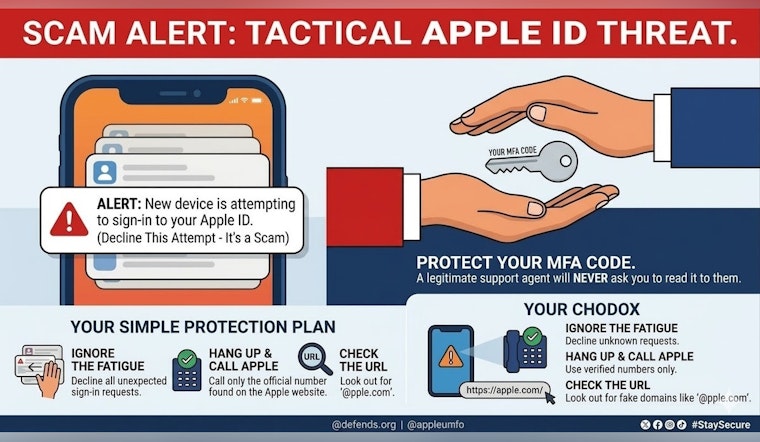
In a Facebook post, deputies shared a detailed warning from the volunteer watchdog group SJC Seniors vs Crime that breaks down how the con usually unfolds, according to the St. Johns County Sheriff's Office. The notice says scammers first hammer a target with “dozens” of multifactor or password reset notifications, then swoop in with a phone call while pretending to be Apple Support.
From there, the caller may steer the victim to a convincing but fake website or simply ask for the verification code that just popped up on their screen. Either move can hand the caller control of an Apple ID. The post also lists a local phone number that residents can call to request fraud prevention presentations and one-on-one help from SJC Seniors vs Crime volunteers.
How The Scam Works
Security researchers say this sort of attack is all about pressure and confusion. Scammers trigger repeated sign-in alerts or password prompts to create a sense of emergency, then push people to approve the sign-ins, read off verification codes, or install remote access software on their devices.
That mix of spoofed webpages, nonstop alerts, and high-pressure phone calls is a classic tech support scam that can quietly deliver full access to an account. A recent investigation by MalwareTips details how these tactics let attackers slip past extra security checks and lock victims out of their own accounts.
How To Protect Yourself
Experts and officials say a few firm rules go a long way here: if you did not start the login process yourself, do not approve any two-factor request. If someone calls you out of the blue, never share a verification code with them. Apple explicitly warns that it will not ask for your verification codes over the phone, according to Apple Support.
The Federal Trade Commission also urges people to use an authenticator app or hardware security key whenever possible and to treat surprise codes as a red flag. If you did not request a code, you should not give it to anyone, per the Federal Trade Commission.
Apple users can add Account Recovery Contacts in their Apple ID settings so trusted friends or family can help them get back in if something does go wrong. Step-by-step instructions are available in Apple's guidance on account recovery.
Local Resources And Reporting
If you think you have been targeted or already read a code to a caller, the sheriff's office says you should move fast. Change your Apple ID password, sign out of any devices or browsers you do not recognize, and then contact Apple Support through its official website or app.
The Facebook post from the sheriff's office lists a direct phone line, 904-209-1432, for SJC Seniors vs Crime volunteers, who offer fraud prevention talks and hands-on help to residents, according to the St. Johns County Sheriff's Office.
Scam attempts can also be reported to the FTC and to local law enforcement. Officials say those reports help them spot patterns, warn the community, and sometimes shut down the scammers before they move on to the next round of calls.